
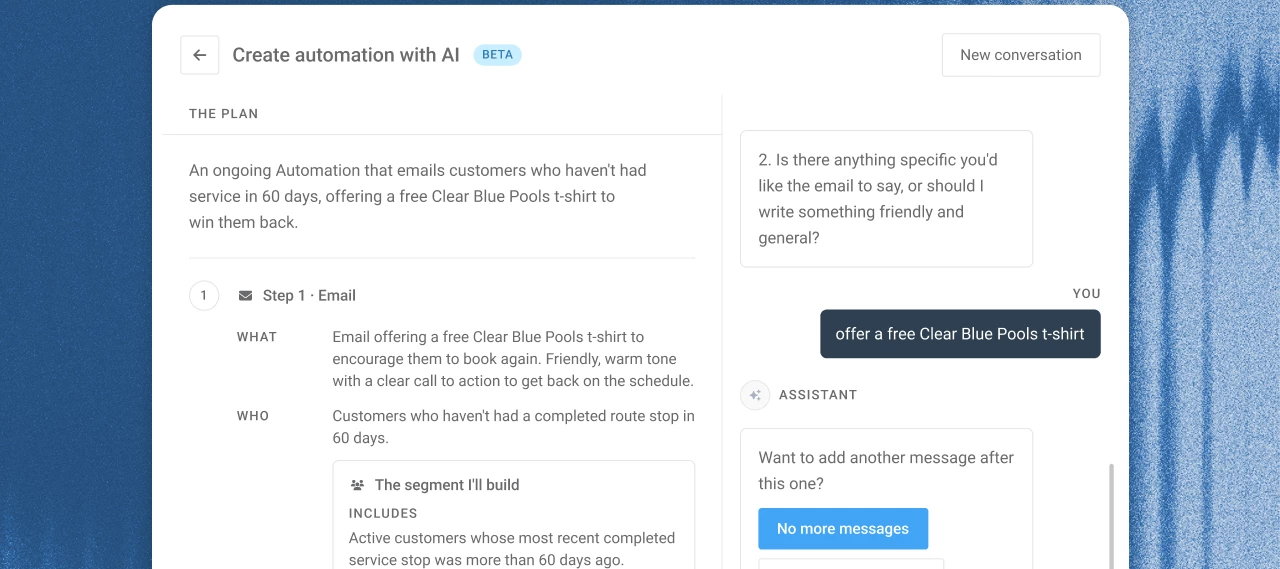



Since Marketing Suite launched, the question we've heard most is "can I customize this?" Starting today, you can.
Campaigns now has a Create button. Describe your campaign idea the way you'd explain it to your office manager. Campaigns asks a few follow-up questions about who should get it, when it should go out, and whether it's an email or a text. Then it builds the audience and drafts the message for you, turning a manual custom email automation build into a quick-and-easy conversation with AI.
🎯 What you can target
Your segments run on the data you already keep in Skimmer:
- Bodies of water: pools, spas, and water features
- Latest CYA and TDS readings
- Equipment, like salt systems and filters
- Work orders by type and completion date
- Route stops, invoices, service locations, and customer tags
Segments stay current on their own. When a customer attribute matches, like a new CYA reading over 100, they move into the segment and the automation goes out.
📤 A few ideas to try
| What you type | What it does |
|---|---|
| "Find pools with a CYA of 100 or more in the last 30 days and offer a drain and refill." | Sends an offer as new high readings come in |
| "Remind customers with a hot tub to book a spa cleaning." | Reaches every pool owner with a hot tub |
| "Send a friendly reminder to customers more than a week late on an invoice." | Nudges past-due customers without a phone call |
| "Email my customers in 85251 about our equipment install special." | Runs a local promo by ZIP code |
👉 You can add steps or change the wait time on any automation, including the pre-built ones.
💡 Good-to-know tips
- The builder drafts the content. Read it over and send yourself a test before you turn it on.
- Segments use the data in Skimmer, so they're only as complete as what's recorded. Equipment and pool size are the fields most often left blank.
- Texts only go to customers who opted in, and your SMS number needs approval before your first text (3–7 business days).
Already using Marketing Suite?
Go to Campaigns and click Create to try it now.
Or, see it in action with an interactive demo!
What's the first campaign you'd build? Share it below. We're collecting ideas for the next round of starter prompts.
Don't have Marketing Suite yet? It's a $150/mo add-on that includes Campaigns and Reviews. See what's included.