




You finish a job, everything went smooth, and then... nothing. No idea how the customer actually felt about it. Or the opposite — something was off, and you don't find out until you've already lost the account. Either way, you're always finding out too late.
Service reviews fixes that. It's a simple way to hear directly from pool owners right after every visit, so you know how you're doing before it turns into a bigger problem.
⭐ How it works

- Pool owners rate their service with a quick 1–5 star tap, right from the service-complete email they already get
- Takes about 30 seconds — no login, no app to download
- They can add a short written note if they want to explain the rating
- Ratings are tied to the specific visit and tech, so you always know exactly what the feedback is about
🔔 Getting the heads-up when it matters
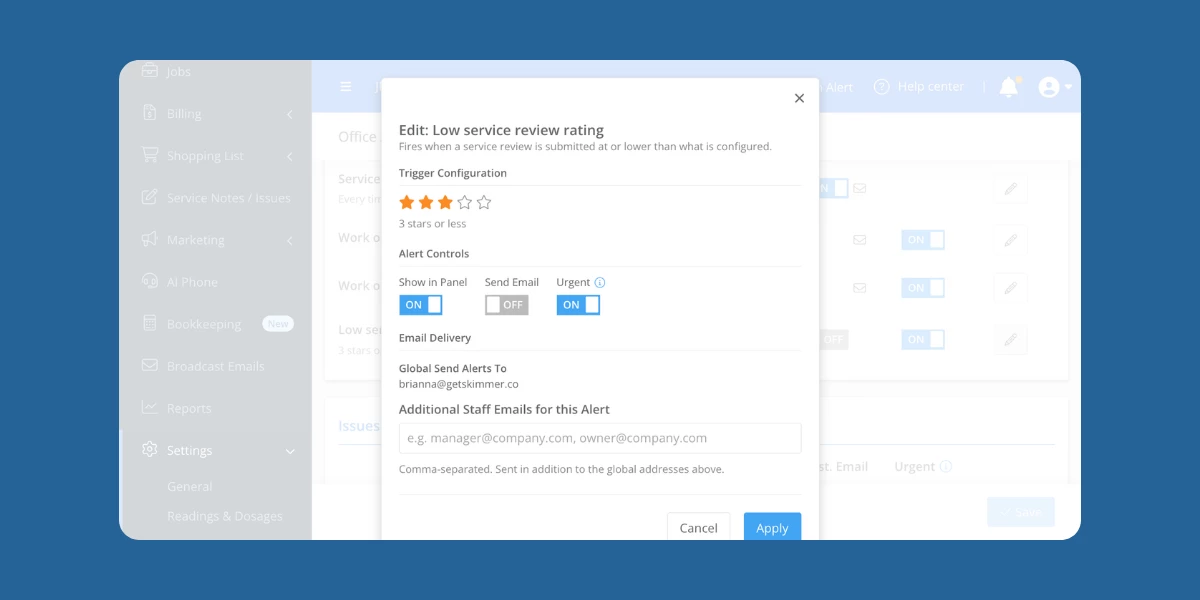
- If a rating comes in low, you get an alert — by panel, email, or urgent notification, your choice
- You set the threshold for what counts as "low" for your company
- That means you can follow up with the customer before it turns into a churn, instead of finding out after the fact
🔒 Private by design

- These ratings are for your team only — nothing gets posted publicly or shared anywhere else
- Stars show up on Service History, the Route Dashboard, and in the customer's activity feed
- Tap into any rating to see the full details: score, written reason, tech, and timestamp
- Over time, this data becomes a clearer picture of how each visit — and each tech — is performing
⚙️ Setup and control

- It's on by default, so there's nothing you need to do to start collecting ratings
- Don't want it? Turn it off anytime in Service Email Settings
- Missed ratings aren't lost — owners get another chance to rate recent visits from their invoice email
Click the link below for more information about how it works.
https://help.getskimmer.com/article/357-service-reviews