



August’s mobile update is about giving your team more control and information without leaving the app. Techs can manage permissions and equipment info on the spot, start a route from wherever they actually are, and office staff have a new way to reach the field in real time.
Permissions management in Settings
You can now see and manage your camera, microphone, notification, and location permissions right from the Skimmer app, no more digging through your phone's settings to figure out why something isn't working. Each permission shows whether it's on or off, has a link straight to your device settings, and includes a quick note on what it's used for. On iOS, some permissions won't show up in your phone's settings until you've used the feature that needs them. Skimmer now tells you that up front, so a missing permission doesn't look like something's broken.
Tech Alerts
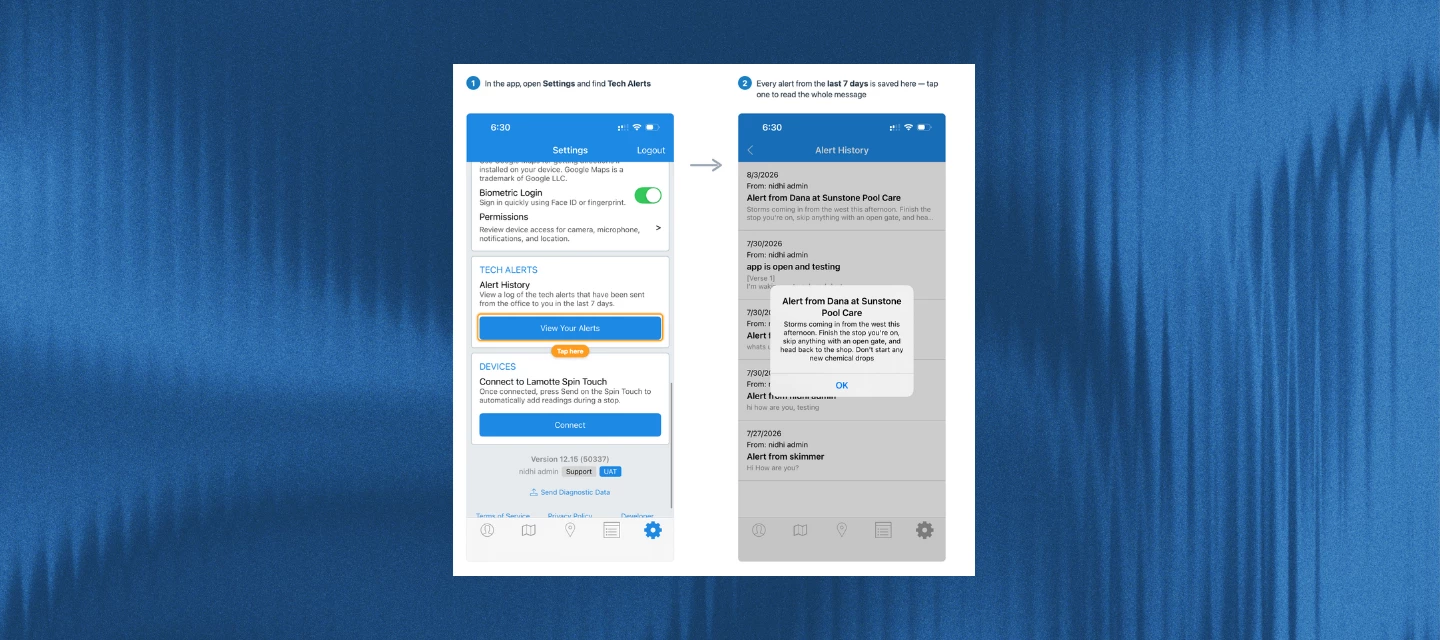
Office staff can now send a message straight to a tech's phone as a push notification, even if the Skimmer app is closed. Pick one tech, a group, or everyone on today's routes, write a message, and it lands in the field right away. It's the tech-to-office half of the Office Alerts you may already be using, so now the conversation runs both ways.
Note: Available on Scaling Up and Skimmer Enterprise. Also, techs need the notifications permission turned on to receive alerts.
[Learn more →]
Equipment tracking on the Pool tab
Pool equipment now shows up right on the customer's Pool tab. Tap into a piece of equipment to see its details, service history, and warranty status, or add a new piece without leaving the screen you're already on.
Start a route from your current location
When you optimize a route, you can now start from wherever you actually are instead of a fixed address. Turn on the location permission and Skimmer builds the whole route around your real starting point, not just the first stop.
Also in this release
- Links from emails, texts, and notifications now open straight to the right screen in the app instead of just the home screen, with a loading indicator, so it's clear something's happening.
- Skimmer now warns you before moving a stop that already has completed work logged, so an accidental drag-and-drop can't wipe out someone's progress.
- Emails for completed services and work orders now include the stop and work order numbers, so office staff can quickly match an email to the right job.
- Techs can now add equipment straight from a route stop or work order without needing the can add/edit customer permission.
Bug fixes
- Fixed an issue where the app could silently skip its startup sync, leaving techs looking at outdated routes, work orders, or customer info with no warning.
- Fixed a bug where checklists could show up twice on some routes.
- Fixed a crash on iOS that happened when a tech tried to attach a video to a quote without granting camera access. Skimmer now asks for permission instead of crashing.
- Fixed an issue where viewing a quote's PDF on mobile showed a license error instead of the document.
- Fixed a bug where the Android app could get stuck on the splash screen after being closed and reopened.
Make sure your team is on the latest version to get all of this: